Simplify and
Streamline school management

Explore dedicated LMS environments for Pre-Primary, Primary, Junior, Senior, Driving, College and Vocational institutions. Each level has its own academic context, while schools use role-based administration to organise learners, staff, records and everyday operations.
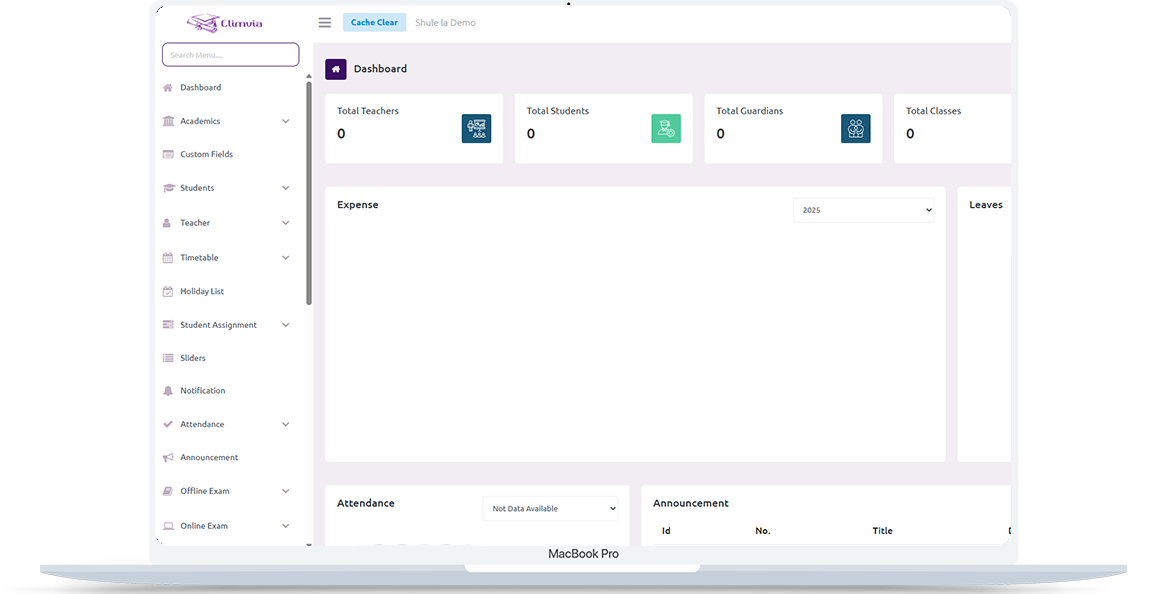
Elimvia LMS interface on a laptop

Choose the Right LMS for Your Institution

Explore seven education-level options below. Each page explains the workflows and institution types it serves. For individual online courses, visit Elimvia Learning.

Elimvia's LMS environments are separately configured. Academic customizations and application integrations are released in stages; confirm supported features before deployment.

Main Key Features

Elimvia LMS brings together institutional administration and academic records. Available tools depend on the education level, permissions and active release.

Independent Education Levels

Each education level uses its own backend, API, authentication context and configuration; institutions operate within their assigned environment.

Session & Semester Setup

Define academic years, terms, and semesters for structured management.

Role-Based Notifications

Send alerts to teachers, students, and parents by role in real time.

Exam Management

Plan, conduct, and manage both online and offline exams with reports.

Attendance Tracking

Monitor daily and monthly attendance with real-time insights.

Lesson Management

Organize curriculum by lessons and topics for each class and subject.

Assignments

Teachers assign, review, and grade homework directly in the dashboard.

Student Promotion

Transfer and promote students to new classes or branches in one click.

Fees & Expenses

Track payments, invoices, dues, and receipts with clear reports.

Staff & Payroll

Add staff, assign roles, and automate salary calculations and deductions.

Certificates & ID Cards

Design and print custom student or staff IDs and certificates.

Holiday Calendar

Plan holidays, events, and term breaks with a shared school calendar.

Gallery Management

Upload and manage school photos and homepage sliders easily.

Website & CMS

Edit website content, news, and blogs from your admin dashboard.

Subscriptions & Billing

Manage school subscriptions, add-ons, and billing cycles in one place.

Simplify Learning with the Student/Parent (Portal) Mobile App

Stay connected with your school anytime. Students and parents access grades, assignments, attendance, and updates directly from the app. No paperwork or delays.

  • View lessons, assignments, and grades in real-time
  • Get instant notifications for attendance, exams, and school events
  • Chat directly with teachers and receive progress reports
Download on the App Store (link coming soon) Get it on Google Play (link coming soon)

App Store and Google Play links will be added when the official listings are ready.

Learn how to get started with the Elimvia Student/Parent (Portal) App
Ask for Setup Guidance

Elimvia Student/Parent (Portal) App Key Features

The Elimvia Student and Parent App connects families with schools. Stay informed, manage progress, and communicate easily.

View Assignments & Results

Students can check homework, grades, and progress reports in real time.

Track Attendance

Parents and students can view daily and monthly attendance summaries instantly.

Instant Notifications

Stay updated on events, grades, announcements, and school news instantly.

Student/Parent (Portal) App

Pay Fees Online

Parents can view invoices, pay fees securely, and download receipts anytime.

Parent-Teacher Messaging

Seamless communication between teachers and parents for better coordination.

Progress Tracking

Parents can view student performance trends and track academic growth over time.

Streamline Teaching and School Management

The Elimvia Staff App helps teachers and administrators manage daily school activities from one platform. Take attendance, grade assignments, send messages, and monitor student progress with ease.

  • Mark attendance and record grades instantly
  • Access lesson plans, assignments, and schedules
  • Communicate with students and parents directly
Download on the App Store (link coming soon) Get it on Google Play (link coming soon)

App Store and Google Play links will be added when the official listings are ready.

Get started with the Elimvia Staff App
Ask for Setup Guidance

Elimvia Staff App Key Features

Simplify attendance, grading, and communication with the Elimvia Staff App.

Attendance Tracking

Mark and manage student attendance from your phone in real time.

Class Management

Access assigned subjects, class lists, and student profiles easily.

Grade Submission

Submit marks and track performance reports instantly.

Parent Communication

Send messages and share updates directly with parents.

Timetable Access

View and manage your daily teaching schedule anywhere.

Instant Notifications

Stay updated with alerts on assignments, meetings, and reports.

One Elimvia Brand, Seven Distinct LMS Environments

Each education level is configured independently. Select the correct level before signing in to the Portal or Staff applications; institution accounts, permissions and sessions are kept separate.

Institution-specific workflows

A driving school, primary school and vocational centre need different records, academic structures and routines.

Independent level configuration

The seven LMS backends have separate authentication, API settings and storage contexts rather than one shared login session.

Feature availability

Academic customizations differ by level and release. Ask for the latest feature demonstration before committing to a deployment.

LMS Guides & Resources

Read practical setup guidance for each education level, school onboarding, and safe student and staff record migration.

Have Questions? Get in Touch!

Talk to our team about how Elimvia can support your school, training center, or organization. We’ll help you choose the right setup and get started fast.

LTR RTL